Resume Builder - CV Engineer
- 4.6
- Rating
- 5.00M
- Installs
- Free
- Price
 Analysis by App-foxy
I approached Resume Builder - CV Engineer as someone who wanted more than a pretty document. A resume has to explain what you can do, survive a quick recruiter scan, and give you a useful starting point when you are unsure how to describe your experience. In that respect, this free business app makes a strong first impression: it combines a resume maker with CV templates and practical advice, rather than treating design as the whole job.
My overall view is positive, with one important qualification. This is best used as a guided starting point, not as an automatic replacement for your own judgement. It can help turn scattered work history into a readable application, especially when you are applying for ordinary roles and need momentum. It is less convincing for highly specialized careers, senior applicants with complex achievements, or anyone expecting a finished resume without editing.
What makes the resume-building process useful
The app’s clearest strength is that it addresses the two problems people usually face at the same time: formatting and wording. A blank document can make even an experienced worker hesitate. You may know your responsibilities perfectly well but still struggle to turn them into concise, relevant statements. A guided builder reduces that initial friction by giving the process a structure to follow.
You May Also Like

 Blood Strike: 2.5 Anniversary
Blood Strike’s Loadouts Turn Every Drop Into a Tactical Gamble
A close look at Blood Strike’s custom loadouts: how fast access to signature weapons reshapes its battle royale rhythm, rewards preparation, and narrows the gap between fights.

 Pandora - Music & Podcasts
Pandora’s Music Is Easy to Start, but Harder to Recover
Pandora’s strength is its low-effort path from a seed to a station. Its weak spot is how much confidence it asks you to place in connection, setup, and quiet recovery.

 8 Ball Pool
 Is Built on Rivalries, Rematches, and Routine
A close look at the rivalries, rematches, shared routines, and unanswered safety questions that turn a quick pool match into a persistent mobile community.

 Samsung Music
’s Quiet Strength Is Playing What You Already Own
Its reach comes less from spectacle than from dependable access to a personal library. That simplicity is both the app’s strongest retention engine and its ceiling.

 AccuWeather: Weather Radar
AccuWeather Review: A Quick, Clear Forecast for Everyday Decisions
For everyday plans, the best forecast is the one you can understand quickly. AccuWeather makes rain timing, radar, and local conditions easy to act on, with a few trade-offs.

 Hill Climb Racing
Why Hill Climb Racing Still Turns Crashes Into One More Run
A tiny car, a bumpy hill and one more upgrade: Hill Climb Racing keeps resurfacing because its simple chaos makes every near-miss feel personal.
More From Our News Desk



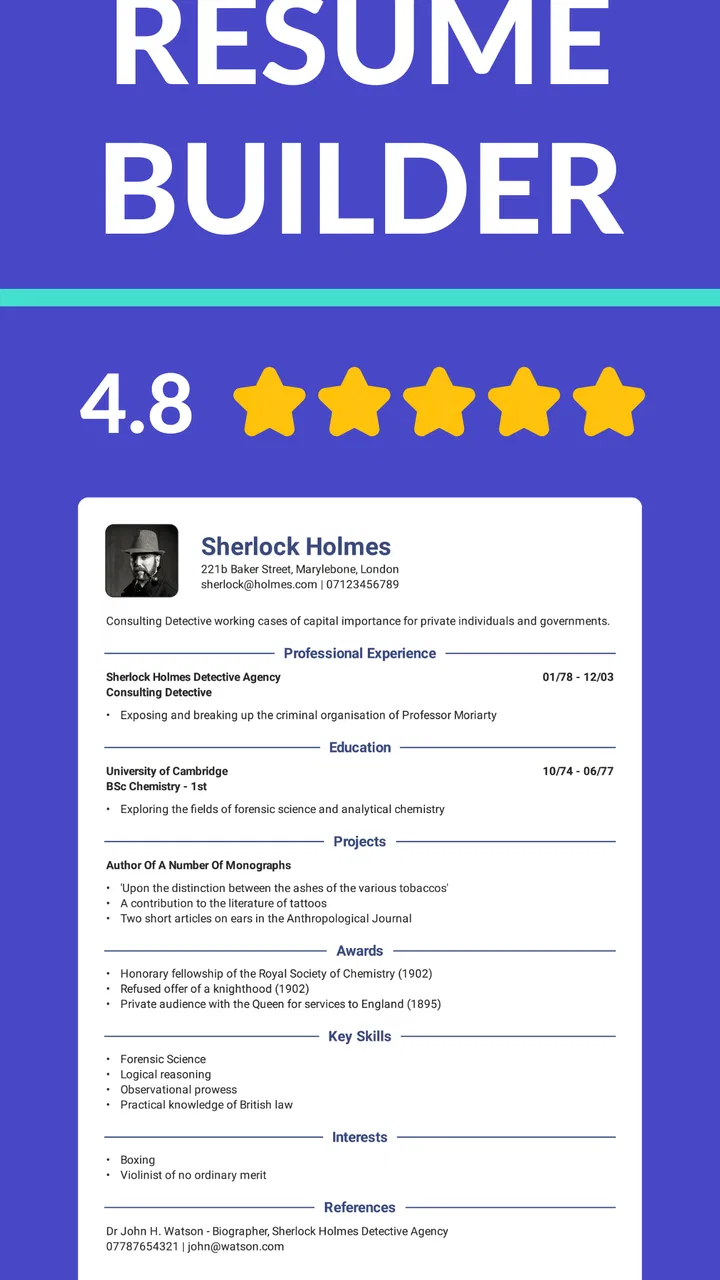
I found the template approach particularly helpful for deciding what deserves attention. A template is not just decoration; it acts as a visual limit. It encourages you to keep sections organized, avoid enormous blocks of text, and present contact details, experience, education, and skills in a predictable order. That matters because a recruiter should not have to search for the basic facts about you.
The advice element also gives the app more value than a simple document editor. A conventional word processor offers complete freedom, but freedom is not always useful when you are starting from scratch. Here, the combination of examples, layout choices, and resume guidance can help a first-time applicant understand what a professional CV is supposed to communicate.
There is a practical advantage to separating content from styling. I recommend writing down the raw facts of your work history before trying to make the page look impressive. Note the tasks you handled, the tools you used, the people or customers you supported, and any clear result you contributed to. Then use the builder to shape that material. This prevents the common mistake of choosing a template first and forcing your experience into whatever space remains.
One of the most useful workflows is to create a broad master version and then adapt it for each vacancy. The master version can contain your full employment history and a wider selection of skills. For a particular application, remove unrelated details and adjust the emphasis. A retail position may need customer service and stock control near the top, while an office role may benefit more from scheduling, software, and document handling. The app is more effective when you treat its output as a flexible base rather than a single resume sent everywhere.
That approach also answers a question many new users have: can the app help if you have little experience? Yes, but only if you supply the raw material. Students, career changers, and people returning to work can draw from education, volunteering, projects, placements, freelance work, and responsibilities outside a formal job. The builder can organize those details, but it cannot honestly invent achievements. The strongest result comes from translating real activities into skills without exaggerating them.
I also like the way a template can expose weak content. If a section looks empty, that is useful information. It may mean you need to add a relevant project, clarify a responsibility, or accept that the role does not require a long resume. On the other hand, if the page is crowded, that is a signal to edit rather than shrink everything until it becomes difficult to read.
For a realistic everyday scenario, imagine someone applying for an entry-level administrative job after working in hospitality. They might initially describe their background only as serving customers and handling orders. With careful editing, the same experience can show cash handling, prioritizing requests during busy periods, resolving complaints, coordinating with colleagues, and maintaining accuracy under pressure. The app cannot know which of those points are true, but its structured format encourages the applicant to look beyond job titles and identify transferable evidence.
That is where my strongest recommendation lies. Use the guidance to improve the explanation of your experience, not merely to decorate it. A fashionable layout will not compensate for vague statements. A plain but focused resume usually has a better chance of communicating value than a visually ambitious page filled with empty phrases.
Templates are helpful, but content still decides the result
The template library gives users a quicker route to a presentable document than starting with a blank page. It is especially useful for people who do not have a strong sense of spacing, hierarchy, or section order. I would still compare the finished page with the job advertisement and remove anything that does not support that application.
One concrete tip is to read the resume aloud after completing it. Awkward wording becomes obvious when spoken, and repeated phrases stand out. Another is to inspect the first third of the document carefully. That area should make your target role and strongest relevant qualities clear without requiring a long search. If the most important evidence is buried near the bottom, rearrange the content rather than relying on the template to solve the problem.
It is also worth keeping a separate copy of your wording outside the app. That gives you a personal record of your achievements and makes future tailoring easier. It protects you from having to reconstruct your work history when applying for another role, and it encourages you to improve the content over time instead of treating one generated document as permanent.
Where the guided approach can fall short
The same structure that helps beginners can feel restrictive to experienced users. Someone with a long career, several related positions, publications, certifications, or a portfolio may need more control over page order and emphasis than a guided builder naturally provides. A traditional word processor or a specialized professional portfolio tool can be better when your application depends on unusual detail.
I would also be cautious about accepting suggested wording without checking it closely. Resume language can become bland when it relies on familiar expressions such as “hard-working,” “team player,” or “excellent communication skills.” Those claims are easy to write and difficult to prove. Replace them with a specific action and outcome whenever possible. For example, explain what you coordinated, improved, organized, or resolved rather than simply describing yourself as capable.
Another limitation is that a template cannot decide how much context a particular employer needs. A short CV may be ideal for an early-career application, while a technical or academic position may require a more detailed record. The app’s convenience should not persuade you to remove evidence that the role genuinely requires. Conversely, adding every task you have ever performed can make the document less effective.
There is also a difference between producing a resume and preparing an application. The builder can help with the document, but you still need to check spelling, dates, job titles, contact details, and the match between your claims and the vacancy. You may also need a cover letter or a portfolio elsewhere. I see this app as one part of a job-search workflow, not the entire workflow.
The free price makes it easy to try, although the app includes optional in-app purchases ranging from around two dollars to around forty-five dollars per item. I would begin with the free experience and decide whether any paid element genuinely improves your process. Do not pay simply because a more elaborate design looks impressive. The value of a resume comes primarily from accurate, relevant content and careful editing.
That pricing detail is especially important for users with a tight budget. A free tool can be enough if you are willing to spend time reviewing the result. If a purchase is presented, consider whether it solves a real problem for your application rather than assuming every extra option is necessary. The basic purpose of organizing and polishing your CV should remain clear before you spend anything.
Who should use it, and who should choose something else?
I think the app is a particularly good fit for students, recent graduates, career changers, casual workers, and people returning to employment after a break. It is also useful for anyone who has been copying an old resume for years and knows the document no longer represents them well. The guided format can provide the push needed to start again without wrestling with page layout.
It may also suit a small-business owner or freelancer who needs a straightforward professional profile for a client, contract, or part-time opportunity. In that situation, the templates can help present a mixed background in a cleaner way. The important adjustment is to emphasize services, outcomes, and relevant projects rather than listing every unrelated task.
I would recommend a different option for applicants whose field depends heavily on visual work, technical demonstrations, academic history, or a detailed portfolio. Designers, developers, researchers, and senior specialists may need a document that works alongside a portfolio or publication record. A general resume builder can still help with the basic employment section, but it should not become the only place where your professional evidence lives.
The same caution applies to applicants targeting employers with strict formatting requirements. If a vacancy asks for a particular file structure, a specific length, or a highly detailed application form, follow those instructions first. A polished template is not a reason to ignore an employer’s process. In some cases, a simple document created in a standard editor will provide more precise control.
Before submitting, I suggest making three checks. First, compare the wording with the vacancy and move the most relevant experience upward. Second, remove claims you cannot support in an interview. Third, inspect the final document on a phone as well as a larger screen. A layout that seems balanced while editing can feel crowded when viewed at a different size. These checks take only a few minutes and often improve the result more than changing templates repeatedly.
The app’s broad audience is reflected in its Everyone content rating, and it runs on Android devices using version seven or later. That makes it accessible to people using older compatible phones, although the quality of the experience will still depend on the device and how comfortable you are editing longer text on a small screen. I prefer doing the first draft when I have time and a quiet place, then using the phone later for small corrections rather than trying to write an entire career history during a commute.
How established is the app?
Resume Builder - CV Engineer comes from developer Matt Callery and has been available since January 2018. It has reached over five million installs, while its average rating sits at 4.6 from around one hundred thousand ratings and roughly one thousand one hundred written reviews. Those figures suggest that the app has found a substantial audience, but they do not remove the need to judge whether its guided style fits your own application.
The current version is 18.01.85. I would keep the app updated when possible, particularly before starting an important resume, but I would still maintain a copy of your text separately. That is good practice with any tool that stores or formats work you may need again. Your career information should not depend entirely on one editing environment.
Compared with a standard word processor, the app wins on direction and loses on complete flexibility. Compared with manually downloading a template, it offers a more focused path because the resume-building purpose and advice sit together. Compared with paying a professional writer, it is far less expensive and gives you direct control, but it also expects you to supply the judgement, evidence, and final proofreading that a human specialist would normally provide.
That comparison explains why I would not call it a universal solution. Its advantage is not that it magically creates a persuasive career story. Its advantage is that it helps ordinary users move from an intimidating blank page to a structured draft, then gives them a format in which to improve it. For many applicants, that is a meaningful benefit.
My verdict after using the builder
I would recommend Resume Builder - CV Engineer to anyone who needs a practical first resume or wants to refresh an outdated one without learning complex design software. Its templates and advice make the early stages less confusing, and its free entry point removes much of the risk of trying it. The app is most valuable when you use it as a coach for structure and clarity rather than as an unquestionable author.
My main reservation is that guided wording and attractive layouts can tempt users into submitting something generic. Take ownership of every sentence. Replace broad claims with evidence, tailor the document to the role, and proofread the final version carefully. If you need advanced control, a portfolio-centered presentation, or a detailed professional CV, another tool may serve you better.
For the typical job seeker, though, the balance is convincing. It helps answer the hardest early question—how do I turn my experience into a readable application?—while leaving room for personal editing. I would install it when starting from scratch, build a reusable master resume, adapt it for each opportunity, and treat the finished document as a draft that earns its quality through my own review.
FAQs for Resume Builder - CV Engineer
01What is Resume Builder - CV Engineer?
Resume Builder - CV Engineer is a mobile app designed to help users create a professional resume or CV directly from an Android or iOS device. It combines guided questions, practical writing advice, customizable templates, and formatting tools so you can organize your education, employment history, skills, and achievements without starting from a blank page.
02Is Resume Builder - CV Engineer suitable for people with no resume-writing experience?
Yes. The app is particularly useful for first-time job seekers, students, graduates, and anyone unsure how to describe their experience. Its step-by-step approach explains what information belongs in each section and offers suggestions for presenting responsibilities and accomplishments clearly. However, users should still proofread the final document and adapt its wording for each specific job application.
03Can I customize the resume design and export the finished CV?
Resume Builder - CV Engineer generally provides professionally structured layouts that can be adjusted with your personal information and career details. After completing the resume, users can typically save or export it in a shareable format, such as PDF, depending on the device and app version. Before applying, check spacing, page breaks, contact details, and the final file name.
04Does the app include advice for improving resume content?
One of the app’s main strengths is that it goes beyond simple text fields. It provides guidance for writing stronger profile statements, describing work experience, selecting relevant skills, and avoiding common resume mistakes. The advice can make a basic CV more polished, although it should be treated as a starting point rather than a guarantee of success or a replacement for tailoring the resume to a vacancy.
05Is Resume Builder - CV Engineer free to use?
The app may offer free access to some resume-building features while reserving additional templates, tools, or export options for a premium plan or in-app purchase. Availability and pricing can differ by platform, country, and current version. We recommend reviewing the store listing and subscription information before downloading, especially if you only need a single resume and want to avoid unexpected recurring charges.
Pros
- Clear
- professional CV templates suitable for different job types.
- Step-by-step guidance helps users structure their work experience effectively.
- Includes useful advice for improving CV wording and presentation.
- Simple interface makes editing and updating a resume quick.
- Works well for creating a polished CV directly from a smartphone.
Cons
- Some templates and features may require a premium subscription.
- Limited design flexibility compared with advanced desktop resume tools.
- Users may need to adjust formatting after exporting the document.
- The app may not support every country’s preferred CV conventions.
- Advanced customization options can feel restrictive for creative professionals.

Resume Builder - CV Engineer
Gallery